
![How to Make Industrial Techno Groove (Free rack) [Ableton Techno Tutorial]](https://img.youtube.com/vi/wRhbl6N5BJs/hqdefault.jpg)
How to Make Industrial Techno Groove (Free rack) [Ableton Techno Tutorial]
5 capitulos
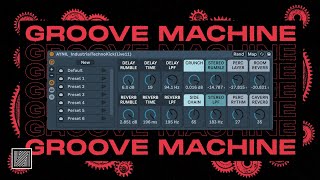
- Introduction and Rack OverviewConcept OverviewTransform classic four-to-floor kick button into an industrial techno groove using multiple processing layers and effects.Rack ApproachThe rack contains different chains and layers built from previous racks (Rumble, Kick Punch) creating a complex but pre-configured tool rather than building from scratch.Macro ControlsFocus on explaining what each macro does and how the rack concept works, allowing users to understand and modify the effects.Free ResourceThe rack is available for free with a download link in the description, encouraging experimentation and customization.
- Rumble Effects and Delay ProcessingRumble MacrosSix black macros control rumble effects using either delay or reverb to add depth and movement to the kick.Delay Controls• Volume control for the delay effect • Low-pass filter to control brightness • Delay time with three positions (nine o'clock, twelve o'clock, three o'clock)Reverb IntegrationClassic reverb with volume, opacity, and decay time controls that work in combination with delay for groove enhancement.Timing FlexibilityPre-delay settings allow reverb to be placed either on-beat or off-beat depending on track BPM and groove preference.
- Crunch and Sidechain EffectsHigh-End EnhancementCrunch macro adds top-end brightness by introducing high-frequency content to the kick.Sidechain ImplementationOverall sidechain control affects all chains within the rack, creating the pumping effect and controlling how much dynamic ducking is applied.Stereo Rumble LayerAdditional rumble effect positioned in stereo with low-pass filter control for width and frequency shaping.Effect CombinationCrunch, sidechain, and stereo rumble work together to enhance the kick's character and create industrial groove characteristics.
- Extra Layers and Advanced ProcessingMid-High Frequency LayerEpic layer adds processing in the mid-high frequency range with selectable delay positions (26 or 27) for long or off-beat delay effects.Reverb Options• Room Reverb for classic room effect • Cavernous Reverb for deeper, more spacious effect • Both available as off-beat alternatives for subtle enhancementLayering PhilosophyMultiple layers available but not all need to be used simultaneously, allowing users to build their own sound by selecting which effects to activate.Sound Design FreedomSubtle use of effects is encouraged, with the ability to customize each layer for individual production style.
- Internal Chain ArchitectureChain Structure• Rumble chain with Kick Verb rack in delay and reverb modes • Kick Punch chain for brightness and punch • Kick Off Verb chain mapped to cavernous reverb layer • Stereo Rumble with additional processingMacro MappingEach chain is mapped to individual macros, allowing layered addition of effects on top of each other.Stereo RoutingReverb is widened in stereo while keeping bass in mono for clarity and punch maintenance.Convolution ReverbsRod convolution reverbs used for character and tone shaping, with flexibility to swap reverb types for personalized sound.
![Complete guide to Techno Drums Pattern (Beginner to Pro) [+free project]](https://img.youtube.com/vi/_0dyDJcX9aY/mqdefault.jpg)



![I made a Ableton Rack's version of the Moog DFAM (free rack ) [Ableton Tutorial]](https://img.youtube.com/vi/3U54iMbu1M4/mqdefault.jpg)