The ULTIMATE Trick to Chop Vocals in Ableton
7 capitulos
- Introduction to Vocal Chopping ProblemsThe ChallengeVocal chops are essential for creating unique beats, but producers often spend money on vocal credits only to find someone else already used the best vocal line.Time InvestmentThe process of manually chopping vocals consumes significant production time.The SolutionThe creator offers solutions using a combination of an unconventional mindset and an underrated Ableton Live feature enhanced with custom racks.Next StepsThe tutorial will demonstrate practical techniques to overcome these challenges.
- Using AI Voice ConversionThe ConceptInstead of spending credits on existing vocals, use AI to convert your own humming or simple melodies into professional singing from various voice options.Implementation Steps• Load your original recording or beat into the voice conversion tool • Select a singer from the available voice library • Increase pitch by one octave for female vocal options to expand choices • Process the conversion to generate professional vocal outputAdvanced OptionsCreate mixed voices by selecting multiple singers, blend different versions together, and generate harmonies for richer vocal arrangements.Cost ConsiderationFree basic conversion allows 15 minutes per conversion, sufficient for short vocal parts. Paid plans offer additional features for projects with longer vocal requirements.
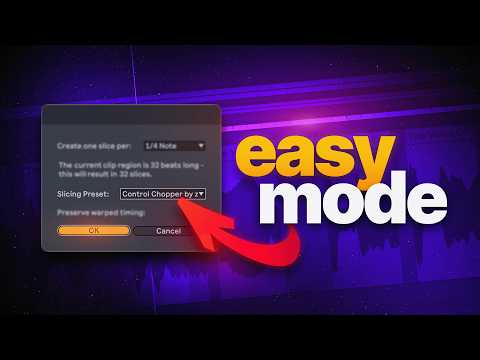
- Basic Vocal Chopping TechniquesTraditional MethodUse the classic Ableton approach with Command+E to manually select and separate vocal chops within the timeline.Quick Slicing• Right-click on the vocal audio for quick access to chopping options • Specify the desired number of chops • Choose to chop by warp markers and transients for precise audio splitting • Select slicing presets to automatically apply effects and processingBuilt-in EffectsSlicing presets include macros that instantly add reverbs and delays, widen the vocal, and apply robotic effects to create dynamic chops.Quick ExplorationUse the pad interface to trigger different chops and experiment with creating rhythmic patterns from your vocal slices.
- Advanced Chopping with Seat ToolSeat Configuration• Select all available slices before beginning • Set voices to one to avoid obnoxious vocal artifacts • Adjust density to control the number of generated slices • Modify duration to increase or decrease slice lengthsCreative ControlMix different duration settings and embrace the randomness that the tool introduces, allowing creativity to shape the final result.Looping FeaturesEnable looping functionality and extend slice lengths to create rhythmic patterns with repeating vocal elements.IntegrationApply the Vocal Chops Booster rack to enhance the processed chops and experiment with different presets for polished results.
- Transform Tool and ReshufflingTool IntroductionThe Transform tool by Philip Mayer serves as the secret weapon for advanced vocal chop arrangement and manipulation.Basic SetupStart with the default chopping preset and highlight all slices simultaneously to prepare for transformation.Reshuffling ProcessPress the reshuffle function multiple times to randomly rearrange the order and timing of vocal slices, creating unique melodic patterns.ResultsThe reshuffled patterns integrate seamlessly into track drops and can be enhanced with volume shaping for polished production.
- Audio Conversion and ManipulationBounce to AudioConvert MIDI chops to audio using the Bounce and Place feature with Command+B for those who prefer working with audio clips.Audio Chopping Method• Highlight audio segments and rearrange them within the timeline • Test different arrangements by moving chops to preview results • Select random segments from your vocal to build unique patterns • Isolate single chops to work with minimal vocal elementsLegendary ShortcutUse Option+Shift+Drag to duplicate audio clips with automatic sample selection, enabling quick pattern creation from different vocal segments.FlexibilityThe shortcut works for both audio and MIDI clips, giving producers multiple workflow options regardless of their preferred editing approach.
- Production Philosophy and Best PracticesMethod SelectionChoose between recording your own vocals, hiring a professional singer, or using existing loops based on your project needs and resources.Human Voice ImpactIncluding even minimal human vocal elements like small chops or isolated vowels makes songs sound more familiar and engaging to listeners.Strategic ApproachCombining vocal elements with instrumental production creates a more cohesive and memorable musical experience for audiences.Continued LearningFurther study of Ableton Live workflows and production techniques will develop skills and improve overall producer capabilities.