Ableton MIDI Tools That Change EVERYTHING!
6 chapters
- Introduction to MIDI Tools in Ableton Live 12OverviewAbleton Live 12 introduced new MIDI tools designed to improve music production workflow. While many tools are impressive for technical purposes, the focus is on practical tools for creating real tracks.Initial AssessmentMost MIDI tools are cool for impressing music nerds but lack practical usefulness in actual production.What's ComingTwo new MIDI devices focused on MPE (MIDI Polyphonic Expression) will be demonstrated with practical applications.Key BenefitThe useful tools shown can significantly enhance workflow when applied purposefully to real music production.
- Glide and LFO Transform ToolsGlide Tool• Glide is a MIDI tool that creates smooth transitions between notes despite its technical name • Access it via the MIDI tab and select notes to apply the glide effect • You can adjust the curve and start point to customize the gliding effectBest ResultsGlide works particularly well on quartz and pad lines, creating more musical note transitions when applied selectively to specific notes rather than entire passages.LFO Capabilities• LFO has three modes: pitch, band slide, and pressure • Pitch mode creates vibrato effects by modulating note pitch over time • You can adjust attack and decay times to shape the LFO effectCreative ApplicationLFO can modulate multiple parameters including waveform frame, filter cutoff, and oscillator sync, making lead lines sound more lively and expressive.
- Pressure Modulation in Reese BassSetupA simple Reese bass patch was created in Wavetable to demonstrate pressure modulation capabilities across multiple parameters.Automatable Parameters• Waveform frame can be automated for tonal variation • Filter cutoff controls the brightness of the sound • Oscillator sync adds harmonic richnessPressure ControlThe pressure modulator was applied to automate various parameters, requiring adjustment of the velocity envelope to match the desired speed of modulation.Practical ExecutionSelective application of LFO on different notes creates varied timbral changes, with some notes left clean while others receive increased modulation amounts and delays.
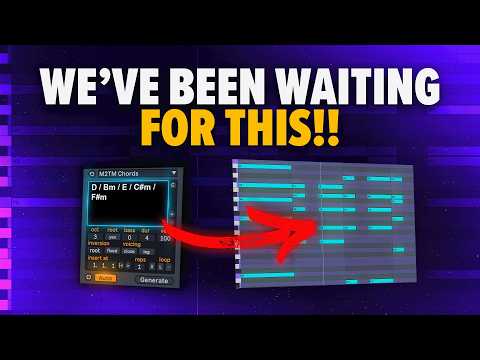
- Chords Device for Chord ProgressionsCore FunctionThe Chords device allows you to write any chord progression and immediately hear the results in MIDI format.Complex Chord Support• Handles complex chords with ease • No need for music theory knowledge due to its simple interface • Chord progressions can be sourced from websites or generated by ChatGPT for inspirationCustomization Options• Add bass notes to enhance the progression • Adjust chord duration and spacing • Choose between voice leading modes for smoother transitions • Link mode helps create top melodiesWorkflow BenefitThe Chords device streamlines chord progression creation, making it easy to experiment with different harmonic ideas in real-time.
- Progressions Device and Generative FeaturesAlternative ApproachThe Progressions device offers a different workflow by choosing from pre-built chord progressions instead of writing them manually.Customization Process• Select a scale (e.g., minor scale) • Choose the key for your session • Pick from simple triads or complex chord voicings • Adjust progression complexity to match your needsRhythmic Patterns• Rhythm option allows creation of different rhythmic patterns • Randomize button generates new progression variations instantly • Pattern selection works with the randomize feature for endless variationsSound Design PhilosophyChords and progressions are just tools; true uniqueness comes from sound selection, arrangement, and rhythm rather than the chord tools themselves.
- Practical Value and Creative WorkflowTool LimitationsStock transformers and generators can create cool musical ideas quickly, but they work best as starting points rather than complete solutions.Speed AdvantageThese MIDI tools accelerate the music production process by allowing rapid experimentation with melodies, harmonies, and modulation.Creative BalanceThe real magic happens when tools inspire ideas that you then refine with your own artistic choices and preferences.RecommendationThe Chords and Progressions devices are particularly valuable for songwriting workflows, offering practical solutions for composers at any skill level.