![Easy Beat Repeat effect for Techno Kick (free rack) [Ableton Techno Tutorial]](https://img.youtube.com/vi/4h_z2mNAvD0/hqdefault.jpg)
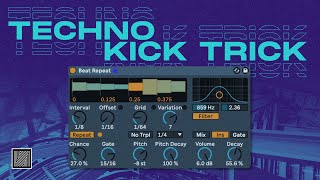
Easy Beat Repeat effect for Techno Kick (free rack) [Ableton Techno Tutorial]
6 chapters
- Introduction and OverviewPurposeA free rack for creating a beat repeat effect commonly used in techno and English music production, particularly useful at the end of 16 bar sections.ApplicationCan be integrated into Ableton Live templates for quick access during music production sessions.Effect ResultCreates a glitchy, stuttering effect on audio tracks by cutting and repeating portions of sound.UtilitéProvides creative control over repetition patterns and timing for dynamic techno production.
- Setting Up Beat Repeat in AbletonDevice SelectionUse Ableton's native Beat Repeat device by default.Initial ProblemDefault interval setting of one bar causes unwanted repetition that triggers automatically, creating an undesirable effect.SolutionChange the interval value to 1/32 to make it shorter than the grid repetition, preventing automatic triggering.Control MethodActivate the repeat effect manually using the repeat button rather than letting it trigger automatically.
- Eliminating Phasing and Configuring Insert ModeProblem IdentificationA weird phasing effect occurs because the repetition plays on top of the original track simultaneously.Isolation TechniquePlace Beat Repeat in insert mode instead of send mode to stop the original track and play only the repetition.ResultClean, isolated repeat effect without the original audio interfering with the repetition pattern.Speed AdjustmentUse the grid button to control repetition speed and create variations in the effect.
- Creating an Effect Rack with Macro ControlRack StructureBuild an effect rack with one macro controlling multiple beat repeat instances, each preset to different speeds.Speed Presets• Steps 0-6 each configured with different speed values • Each increment triggers a different repetition rate • Easy to remember and switch between during productionMapping ConfigurationMap the toggle on/off button of each repeat instance to the macro, setting specific macro values to activate each speed preset.Automation BenefitSimple macro control enables easy automation in the Arrangement view for dynamic effect layering.
- Advanced Configuration and Interval DoublingDuplication StrategyDuplicate beat repeat devices and adjust speed values for each instance to create multiple preset options.Interval IssueWhen grid speed becomes faster than the interval, the repeat triggers even when the button is off, causing unwanted effects.Mapping Solution• Map interval toggle on/off to the macro alongside repeat buttons • Use paired macro values (1-1, 2-2, etc.) to synchronize interval and repeat activation • Prevents unintended triggering at higher speedsFinal SetupDouble interval values (128, 256) for each new device to maintain proper sequencing and prevent CPU overhead.
- Live Performance Setup and ConclusionStudio vs. LiveMacro automation is efficient for studio production but less practical for live performance where immediate control is needed.Performance ConfigurationRemove macro mappings and assign each repeat button directly to MIDI controller pads for real-time triggering during live sets.Controller Mapping• Assign 1/8 speed to one pad • Assign 1/16 speed to another pad • Create accessible controls for on-the-fly effect triggeringDistributionThe complete rack is available for free download via link in the video description.
![Full Industrial Techno track from Scratch (free project) [Ableton Techno Tutorial]](https://img.youtube.com/vi/74tjKQxemJE/mqdefault.jpg)
![How to make Industrial Techno Synth (free rack) [Ableton Techno Tutorial]](https://img.youtube.com/vi/39KNJ-1tJMI/mqdefault.jpg)