The Most Underrated Plugin In FL Studio - Fruity Convolver Tutorial
9 capitulos
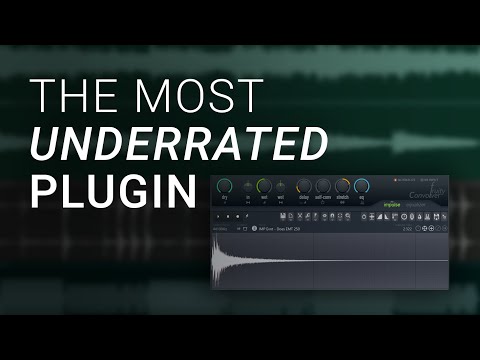
- Introduction to Fruity ConvolverWhat It IsFruity Convolver is an underrated FL Studio plugin that functions as a reverb, providing access to real acoustic spaces and sampled hardware reverbs.Why It's OverlookedMost FL Studio users don't know about the plugin or don't use it because it looks confusing at first glance, resembling an audio recorder rather than a typical reverb plugin.How to AccessLoad it from the mixer by selecting a plugin on any channel. It's located at the top of the delay and reverb sections, just above Fruity Reverb 2.PreviewAlthough the interface looks complicated initially, the plugin is extremely simple once you understand how it works.
- Understanding Convolution TechnologyCore ConceptConvolution works by taking a snapshot of an acoustic space or device and combining your input signal with an impulse response to recreate that environment.What Is Impulse Response• An impulse is a short, sharp broadband signal (like a click) • The response is how an acoustic space reacts to that impulse • A cathedral response creates a long, spacious reverb tail • A tiled bathroom response creates a shorter, more reflective soundHow It WorksThe plugin combines your vocal or instrument with the impulse response in a special way that makes it sound like you're performing in that particular space.Hardware ApplicationsThe same technology applies to rare or expensive hardware reverbs. You run an electronic impulse into the hardware and record the output, giving you access to vintage plate reverbs and other equipment.
- Basic Controls and PresetsAvailable Presets• Chambers - simulated chamber spaces • Corridors - hallway and passage reverbs • Exteriors - outdoor acoustic spaces • Guitar Cabinets - amplifier cabinet simulations • Real Spaces - recorded authentic locations • Reverb Devices - sampled hardware reverbs including Eventide CathedralWet and Dry MixUse the wet and dry controls to blend between your original signal and the reverb effect. Turning dry all the way down leaves only the reverb signal.Input Stereo ControlDetermines the stereo separation of the input signal feeding the reverb. You can control whether the reverb picks up a wide stereo signal or a mono signal.Output Stereo ControlAdjusts the stereo separation of the output reverb signal. It's recommended to keep this in the middle, as other settings can sound hazy.
- Advanced Parameters: Pre-Delay and Self ConvolutionPre-Delay FunctionControls the time gap between your dry signal starting and the reverb beginning. Particularly useful for vocals to separate the reverb from the main signal.Pre-Delay ApplicationAdding 50-75 milliseconds of pre-delay prevents the reverb from stepping on top of vocals and allows the main performance to sit cleanly in the mix.Self Convolution EffectConvolves the impulse response before combining with the dry signal. This can make sounds more blurred and smooth, or potentially mess them up depending on the setting.Practical ExperimentationTry adjusting self convolution to see if it works for your specific source material and desired sound character.
- Stretch Parameter and Reverb DecayWhat Stretch DoesThe stretch parameter adjusts the length of the impulse response sample. Cathedral samples are extremely long, so stretch lets you modify their duration.Shortening ReverbsDecreasing the stretch value makes the reverb tail die away quicker, useful for tighter mixes or shorter spaces.Lengthening ReverbsIncreasing the stretch value extends the reverb tail, making it continue much longer and creating more spacious effects.Practical ValueStretch is a very effective tool for adapting preset reverbs to match your specific tempo, mix requirements, and desired decay characteristics.
- EQ Mix and Equalizer ShapingBuilt-in EQ FeatureFruity Convolver includes an integrated equalizer, one of its strongest assets. This is accessed on the Equalizer tab and lets you shape the reverb extensively.EQ Drawing Technique• Left-click and drag to draw any EQ curve you want • Hold Alt while dragging to create smooth, gradual curves • Isolate frequency ranges to hear the reverb character at those frequenciesAbbey Road TechniqueA professional technique where you roll off the low end, roll off the high end, and boost the mids. This makes the reverb sit more naturally in the mix.EQ FlexibilityYou can create high-end only reverbs, low-frequency reverbs, or mid-focused reverbs. Most reverb plugins don't offer such intricate EQ control.
- Listening Examples and Preset ExplorationCathedral Preset DemoThe Eventide Cathedral smooth preset is a well-known hardware reverb that transforms a cello recorded in a studio to sound like it's performed in a large cathedral space.Bathroom Preset DemoSmaller spaces like tiled bathrooms produce noticeably different reverbs with more reflections and a smaller decay, creating a completely different character.Real Spaces ExamplesPresets like Real Spaces cave chamber demonstrate that different impulse responses provide unique sonic qualities impossible to achieve with algorithmic reverbs like Fruity Reverb 2.Sound Design PossibilitiesThe plugin opens up many more reverb possibilities beyond traditional algorithmic reverbs, giving access to authentic acoustic and hardware characteristics.
- Creating Custom Impulse ResponsesSetup Process• Load Fruity Convolver on a channel • Load your favorite reverb plugin in the middle • Load another Fruity Convolver after it, creating a sandwich arrangementRecording the IRSet the bottom Convolver to record mode. Trigger an impulse at the top, which travels through your reverb plugin and gets recorded as an impulse response file.Using the RecordingOnce captured, the impulse response in Fruity Convolver sounds nearly identical to running audio through the original reverb plugin, though without access to all the original plugin's controls.Expanding Your LibraryYou can drag custom impulse responses into the user presets section. Hundreds of thousands of IRs are available online from hardware units and acoustic spaces, or you can use any audio sample including drums or crashes for creative sound design.
- Final Thoughts and RecommendationsPlugin PotentialFruity Convolver is a fantastic tool that has been neglected by many FL Studio users despite being available for free.Why It MattersAll FL Studio users have access to this powerful reverb plugin but most aren't making the best use of it.Creative FlexibilityThe plugin offers incredible possibilities for different sound design approaches, from traditional reverbs to experimental uses with unconventional audio samples.Next StepsStart using Fruity Convolver in your productions. A follow-up video exploring more advanced techniques may be created in the future.