New FL Studio Keyboards - Novation FLkey 49 and FLkey 61 First Look
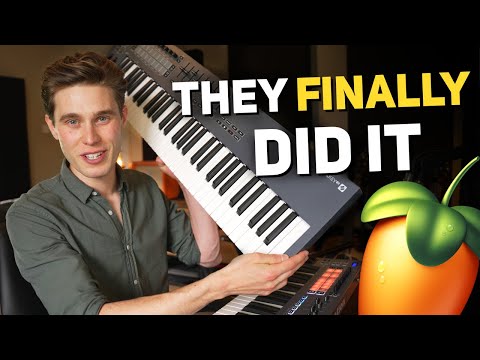
Novation released the FL key 49 and 61 key midi controllers for FL Studio
5 capitulos
- Introduction and OverviewNew ReleaseNovation released the FL key 49 and 61 key MIDI controllers for FL Studio, expanding the existing FL key mini (25 keys) and FL key 37 lineup.Core IntegrationThese keyboards have seamless integration with FL Studio - plug them in, load the software, and everything syncs up automatically without additional setup.Key AdvantageThe integration between keyboard and software makes your workflow easier when producing music by keeping you at the controller instead of using a mouse.Chapter Overview• Build quality and construction • Design and aesthetics • Features and functionality • Comparison between all models
- Pad Modes and Core FeaturesDrum ProgrammingThe pads sync to the step sequencer for easy drum programming, allowing you to switch between channels, select individual steps or groups, and adjust properties to dial in grooves without a mouse.Performance Modes• Finger drumming mode that links to the FPC for seamless drum playing • Instrument sequencing for playing full chords from the pads • Scale and root note selection with voicing optionsTransport ControlsPlay, pause, record, undo, and redo controls are available directly on the keyboard and actually work reliably with FL Studio, unlike many other MIDI keyboards that have integration issues.Standard Features• Full-sized, semi-weighted keys with nice spring and weight balance • USB MIDI connectivity with dedicated MIDI in/out • Sustain pedal input • No power button (keyboards are powered via USB)
- New Features in 49 and 61 ModelsExtended KeysThe 49 key model offers four octaves and the 61 key model offers five octaves, providing significantly more range than the smaller models.Fader Controls• Nine faders total - eight for controlling mixer channels and one for the master channel • Banking buttons to switch between sets of eight faders • Non-motorized design with good weight and resistance that feels deliberate and careful • Pickup mode enabled by default to prevent volume spikes when banking between fader setsPattern ModeNew feature allowing you to create or clone patterns directly from the keyboard by holding shift and pressing preset buttons, enabling quick variations without switching to the mouse.Firmware UpdatesThe pattern mode feature has also been added to the FL key 37 through a firmware update.
- Design, Build Quality, and ComparisonDesign PhilosophyThe design is very minimal and plain, which works well for a production keyboard where focus should be on music creation rather than visual complexity.Build Quality• Keys do not yellow or fade over time, even after a year of use • Constructed with care and attention to detail • No corners cut - feels like a solid, quality piece of equipment • Clearly made to lastModel Differences• FL key mini: Compact with small keys, best for triggering samples and sound design with small footprint • FL key 37: Three octaves, solid for performers wanting full-sized keys with moderate desk space • FL key 49: Four octaves with faders, fits on most workstations with keyboard stand or under-desk tray • FL key 61: Five octaves with faders, ideal for classical pianists or live performers needing full expressionFader AdvantageOnly the 49 and 61 models include faders, which is a key differentiator if you need direct mixer control without looking at the screen.
- Workflow Benefits and ConclusionWorkflow ImprovementThese keyboards are designed to give you much more control of the DAW from the controller, keeping you immersed in your production without reaching for the mouse.Tactile ExperienceThe semi-weighted keys and faders provide a more immersive, tactile experience compared to keyboard and mouse production alone.Key Playing FeelThe semi-weighted keys strike a fine balance - they're expressive enough for smooth piano and string sounds while maintaining springy responsiveness for faster, synth-based playing.Support and HelpThe creator offers support through comments, Instagram, and Discord for questions about these keyboards or anything else related to music production.