FL Studio Harmless Synth Tutorial
11 capitulos
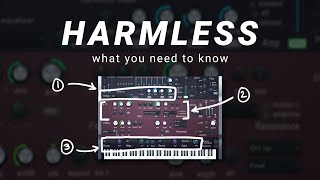
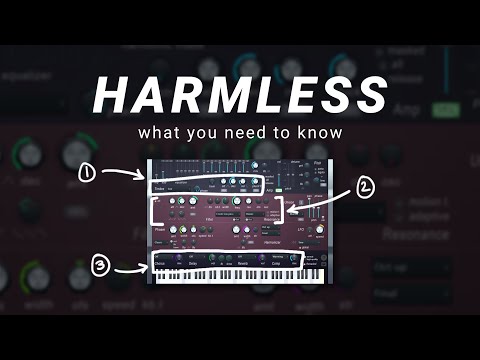
- Introduction to Harmless and OverviewVideo PurposeTutorial on the Harmless synthesizer in FL Studio, part of the basics series showing how to create professional sounds from the default patch.Sound Examples• Lush professional pads • Professional plucks • Professional bass soundsMain ChallengeThe Harmless interface is intense and overwhelming at first, with all controls visible on one screen with no extra pages or menus.Solution ApproachA three-step process to simplify the interface by sectioning off controls and focusing only on the ones you need.
- Understanding the Interface and Default SoundSetupHarmless synthesizer loaded in FL Studio with an EQ used as a visualizer to see frequency changes discussed in the video.Initial SoundThe default patch has a filtered sound that needs the frequency dial in the middle turned all the way up to open it up and get a nice open sound.Interface DesignEvery single control is on the interface with no hidden pages or menus, making it overwhelming but providing direct access to all parameters.Foundational Steps• Sound generation • Sound shaping • Voice configuration
- Step 1 - Sound Generation and ShapingTimbre SelectionChoose your base waveform starting with saw, which is versatile and recommended for beginners. You can also load custom single-cycle waveforms.Volume Envelope Controls• Attack: controls how long it takes sound to reach maximum volume • Decay: controls how quickly sound drops after the peak • Release: controls how sound fades when note endsSound Design ApplicationsShort attack and decay create pluck bass sounds, while long attack and decay create spacious pad sounds.Unison ConfigurationAdd multiple voices (5-6 recommended) to create wide, spacious sounds. Adjust pan width, style (blurred recommended), and pitch variation for additional texture.
- Pluck Filter and Voice EffectsPluck ControlA special filter that smoothly and quickly removes the high end of the sound, useful for creating chunky pluck sounds.Unison Styles• Classic: standard unison • Blurred: softer, mushier sound • Uniform: different voice optionsVoice SpreadAdjust pan width to spread voices narrowly for focused sound or widely for spacious stereo effect.Advanced Voice ControlsModify pitch, phase, and variation of different voices for more advanced sound shaping.
- Step 2 - Filtering and EQ ControlsHarmonic EQAn equalizer that tracks the notes you're playing, allowing you to remove specific harmonics (first, second, third, etc.) rather than just cutting frequencies.Harmonic Mask FeatureRemove harmonics 1-12 with precision control, giving much more tonal control than a standard EQ and tracking with the notes you play.Sub and Low ProtectionInduce sub frequencies and harmonics below your played note, and use low harmonic protection to preserve low end integrity even when filtering.ImpactThese tools provide precise control over tone and texture beyond what standard filtering can achieve.
- Filter Section and EnvelopeFilter Types• Low-pass filter: cuts high frequencies, allows lows through • High-pass filter: cuts low frequencies, allows highs throughFilter ControlsAdjust resonance and frequency cutoff. Low harmonic protection preserves lowest note in chord from filtering.Filter EnvelopeAttack and decay settings make the filter swell up and down, creating wobble and pluck effects with quick attack and decay times.Standard LayoutFilter settings are standard across synthesizers but arranged differently in Harmless, using curve shapes instead of draggable graphs.
- Step 3 - Effects SectionAvailable Effects• Phasers: phase the sound for movement • Delay: classic, ping pong, or stereo options • Reverb: various room types and sizes • Compression: increases volume as you increase mixEffect QualityEffects sound clean and professional. Many users rely on Harmless built-in effects rather than loading external effect plugins.Effect PlacementUnlike most synthesizers where effects are hidden behind menus, all effects are visible upfront in Harmless.Practical ApplicationA touch of reverb on bass can make it sound more spacious, even though traditional wisdom suggests avoiding reverb on bass sounds.
- Advanced Features: Grit and LFOGrit ControlSlightly detunes or tunes up various harmonics, creating metallic sounds useful for percussion synthesis or interesting tonal features in low-end sounds.LFO BasicsLow frequency oscillator that acts as a predetermined automation clip, controlling various parameters up and down at a selected speed.LFO Wave Shapes• Sine wave: smooth up and down • Pulse: turns on and off with no rampLFO ApplicationAlmost every control has an LFO option beside it. Controlling filter frequency with LFO creates rhythmic wobble and movement effects.
- Sound Design Example 1 - Pluck BassStarting PointLoad default patch and select the desired octave range for the bass sound.Envelope ShapingPull down the decay to create a short pluck effect, giving the bass a percussive attack and quick tail.Tone Control• Use pluck feature for natural high-end click • Use EQ to remove unwanted clicks in high frequencies • Add subtle reverb for spaciousness • Increase unison for modern, wide soundFinal PolishAdd distortion from compression section. Consider using EQ later to ensure mono, solid low end.
- Sound Design Example 2 - Pad SoundEnvelope SetupTurn attack up to avoid immediate sound start. Set long release and decay so sound fades away gently instead of cutting off.Spatial EffectsAdd reverb with a big cathedral setting to create spacious, evolving pad texture.Voice LayeringMaximize unison to 9 voices and enable high quality mode for smoother, richer pad sound.Harmonic ExperimentationUse harmonic mask feature to create metallic tones and more textured variations of the pad sound.
- Summary and Next StepsThree-Step Process• Generate and shape the sound • Filter the sound • Add effectsKey TakeawayBreaking down the interface into sections makes Harmless much less overwhelming. Understanding where sound is generated, how to shape it, and where effects go demystifies the synthesizer.Sound Design SeriesThe channel offers a comprehensive sound design series covering beginner and advanced techniques, as well as recreations of classic and modern synth sounds.Universal ApplicationThe techniques taught for Harmless apply to other synthesizers like Serum, Helm, and Massive, making them valuable for any synthesizer you use.